


Okayo WT-350 D
City Jungle Edition
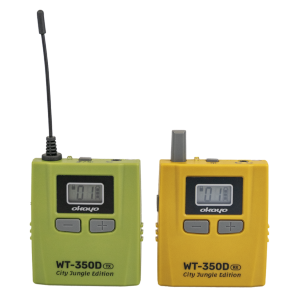
1. Interface
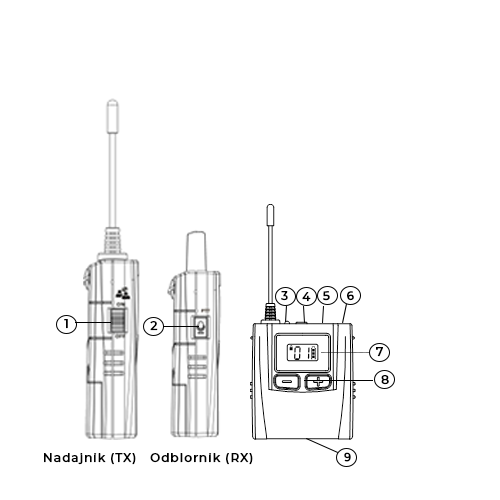
- Talk-Back Function Slider (TX)
- PTT Button (RX)
- Signal Indicator
- ⏻︎ / Mute Button (TX)
- Built-in Microphone
- Talk-Back Function Indicator
- Display
- +/- Buttons
- Charging Port
2. Signal Indicator
|
Status |
Transmitter (TX) |
Receiver (RX) |
|---|---|---|
|
Green |
Full power |
|
|
Red |
Low power (30 min ↓) |
|
|
LED is solid |
Device is on |
Device joined the group |
|
LED flashes slowly |
Microphone muted |
Device is out of group |
|
LED flashes quickly |
Grouping in progress |
- |
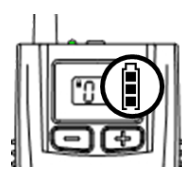
3. Battery Level Indicator
|
Battery charge percentage |
Symbol on display |
|---|---|
|
50% 🠕 |
|
|
5~50% 🠕 |
|
|
5% 🠗 (< 30 min) |
|


4. Low Battery Level
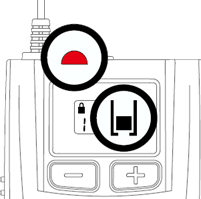
⚠ Battery Warning
- Ensure that each device has a compatible AA battery or rechargeable battery installed.
- Replace the battery when the device indicates a low battery signal.
5. Turning on the device
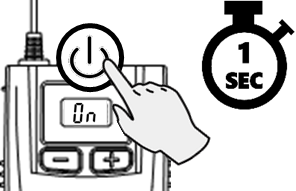
Press and hold the ⏻︎ button for 1 second to turn on the device.
6. Creating a group
⚠ Note
Grouping is performed by the guide from the transmitter (TX). Group members only turn on their receivers (RX).
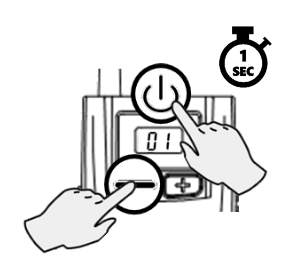
- Press and hold the – and ⏻︎ buttons simultaneously for 1 second to turn on the transmitter (TX).
- Within 5 seconds, select a channel using the + / - buttons and confirm by pressing the ⏻︎ button.
- When the signal indicator on the transmitter starts flashing rapidly, turn on the receiver ⏻︎ to join the group.
- When the receiver shows the same channel as the transmitter and the solid signal indicator lights up, grouping is complete.
- Exit by pressing the ⏻︎ button on the transmitter and begin the tour.
7. Adjusting headphone volume
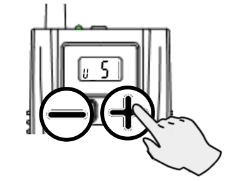
Adjust the volume using the + and - buttons (0~9, default: 5) on each device.
8. Giving group members the floor
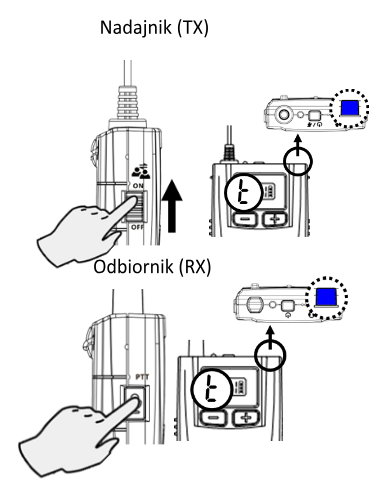
- Slide the Talk-Back function slider on the transmitter (TX) upwards to activate this function for the group.
- The “t” icon appears on the transmitter (TX) and receiver (RX) displays. On the transmitter (TX), the Talk-Back function indicator lights up blue.
- Press the PTT button on the receiver (RX) to ask a question (the blue indicator on the receiver lights up when a group member has the right to speak).
9. Adjusting settings
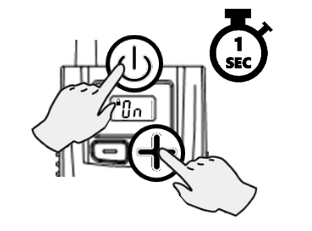
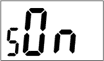
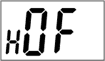
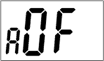
- Press and hold the ⏻︎ and + buttons simultaneously for 1 second to turn on the device.
- Adjust each setting with the + and - buttons, confirm by pressing the ⏻︎ button.
- Settings mode will automatically exit after the last configuration is completed.
|
Transmitter (TX) |
||
|---|---|---|
|
|
Signal output power The higher the power, the greater the operating range. |
|

|
Receiver (RX) |
||
|---|---|---|
|
|
Power saving The device will automatically turn off if the signal from the transmitter is lost for 20 minutes. |
|
|
|
HAC Activate this setting (On) for HAC system users. |
|
|
|
Out-of-range alarm The alarm will activate in the receiver (RX) if it is out of the transmitter's (TX) range for 1 minute. To deactivate the alarm, move closer to the transmitter (TX). |
|
10. Remote channel change
⚠ Note
Remote channel change is recommended when interference occurs.
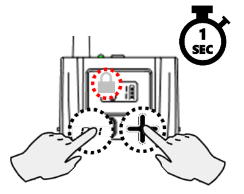
- Press and hold the + and – buttons simultaneously on the transmitter for 1 second to unlock channel changes (the 🔒︎ icon will disappear from the display).
- Select a different channel using the + and - buttons. The new channel will be automatically locked after 5 seconds of inactivity (the 🔒︎ icon will appear on the display).
- Receivers will be automatically and remotely switched to the new, selected channel.
11. Turning off the device
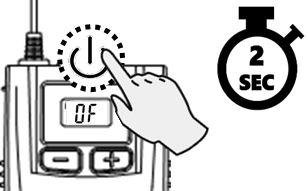
Press and hold the ⏻︎ button for 2 seconds on each device to turn it off.
12. Increasing device power (additional function)
⚠ Note
If necessary, it is possible to set a very high power to achieve a greater range.
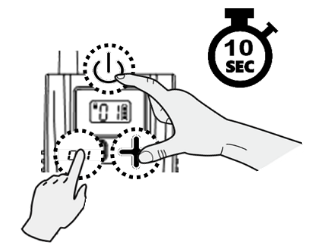
- When the transmitter (TX) is on, press and hold the ⏻︎, +, and – buttons for 10 seconds. The “.” icon will appear on the display.
- Press and hold the ⏻︎, +, and – buttons again for 10 seconds to turn off this function. The "." icon will disappear from the screen.
- The setting will be remembered until manually changed (turned on or off).
13. Specifications
|
Parameter |
Value |
|---|---|
|
Emission modulation |
4 GFSK, digital |
|
Radio frequency |
823 ~ 832 + 863 ~ 865 MHz |
|
Channels |
44 |
|
Frequency response |
200 ~ 3,400 Hz |
|
Range (line of sight) |
100+ m |
|
Battery life |
Transmitter: 15+ h, receiver: 20+ h |
|
Battery |
1 x AA Ni-MH or alkaline battery |
|
Dimensions (with antenna) |
63 x 132 x 70 mm |
|
Weight (with battery) |
approx. 65 g |