


Okayo WT-300 D
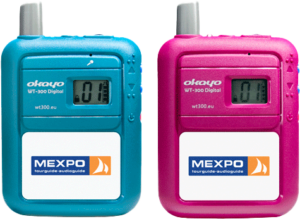
1. User Interface
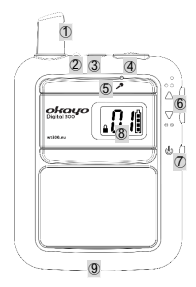
- Antenna
- Signal Level Indicator
- Microphone (TX) / Headphone (RX) Jack
- Volume Level
- Built-in Microphone
- Up / Down Arrows (▲▼)
- Power Button (⏻︎)
- Display
- Charging Contacts
2. Signal Level Indicator
| Status | Transmitter | Receiver |
|---|---|---|
|
Green |
Full Power |
|
|
Red |
Low Battery Level (<10%) |
|
|
Steady Light |
Device On |
Device Belongs to a Group |
|
Slow Flashing |
Microphone Muted |
- |
|
Fast Flashing |
Grouping in Progress |
- |
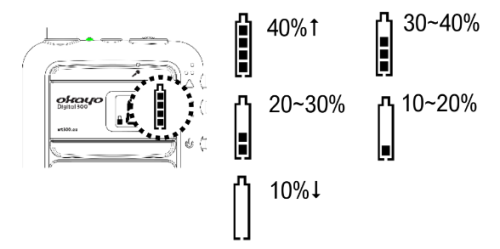
3. Battery Level Indicator
4. Low Battery Level
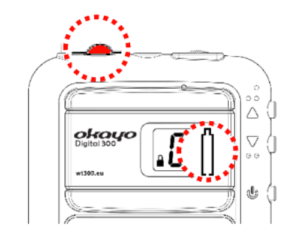
⚠ Battery Warning
- Ensure that a compatible AA battery or rechargeable battery is inserted in each device.
- Replace the battery with a new one when the low battery signal appears on the device.
5. Volume Level Adjustment for Hearing Aid Users
Hearing aid users should set the headphone volume to maintain compatibility with the hearing aid.
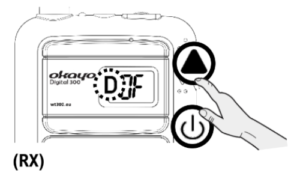
- Press and hold ▲ to turn on the device (⏻︎), the message
 will appear on the screen.
 - Use the ▲ and ▼ arrows to select , then confirm / exit by pressing ⏻︎.
- The message will appear on the screen. Ignore this message and exit by pressing ⏻︎.
6. Power On
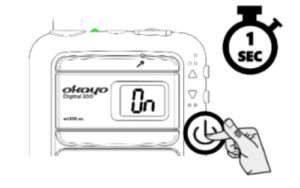
Press and hold the ⏻︎ button until the transmitter or receiver turns on.
7. Grouping
⚠ Note
Group members simply turn on their receivers (RX) and proceed when the guide (TX) completes grouping.
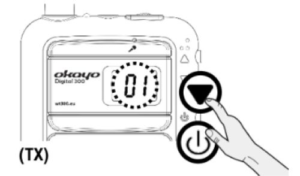
- Use the ▲ or ▼ arrows to select the preferred channel.
- Then turn on the receivers by pressing ⏻︎ to receive the grouping signal from the transmitter.
- Ensure that the receivers display the same channel as on the transmitter. After turning on all receivers, complete grouping by pressing the ⏻︎ button on the transmitter.
8. Volume Adjustment – Headphones / Microphone
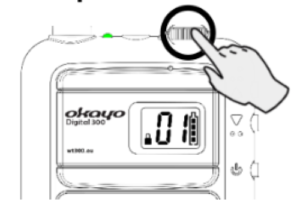
Use the dial to adjust the volume.
⚠ Note
Transmitter: The microphone is muted (slow flashing of the signal indicator) if the volume is set to the lowest level.
Receiver: Listening to high-volume sound for extended periods may damage hearing.
9. Selecting a Different Channel for the Group
⚠ Note
We recommend selecting a different channel if interference occurs.
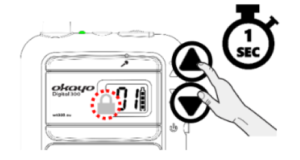
- Press and hold both arrows ▲▼ together to unlock the device (the 🔒︎ symbol will disappear).
- Use the ▲▼ arrows to select a different channel.
- The new channel will be confirmed automatically if no action is taken for five seconds.
10. Power Off
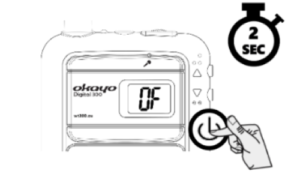
Press ⏻︎ to turn off any device.