


Maytel Grand Multicom 2.4G
1. Basic Information
1.1. Description
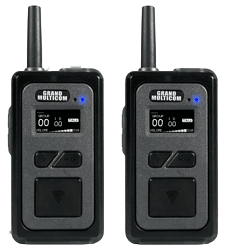
GRAND MULTICOM is the most advanced two-way communication device, providing up to 10 simultaneous talking users with hands-free operation. GRAND MULTICOM combines reliable performance, quality, and versatility with easy-to-use, state-of-the-art technology.
1.2. Features
- 9 users from an unlimited number available per group talking simultaneously hands-free + 1 optional user using PTT (Push-To-Talk), while others receive the transmission.
- Advanced CODEC protocol minimizes the impact of terrestrial interference and offers a super dynamic noise reduction range of over 95dB.
- Sufficiently long direct talk range of ~500 m, typical for the 2.4 GHz version.
- Secure PIN code encryption per group and a large, clear OLED display showing group and ID on one screen simultaneously.
- Durable and robust mechanical design with IP67 ingress protection, including a detachable antenna system.
- Convenient drop-in charging, individual USB charging, and a replaceable battery system.
2. Illustration and Description
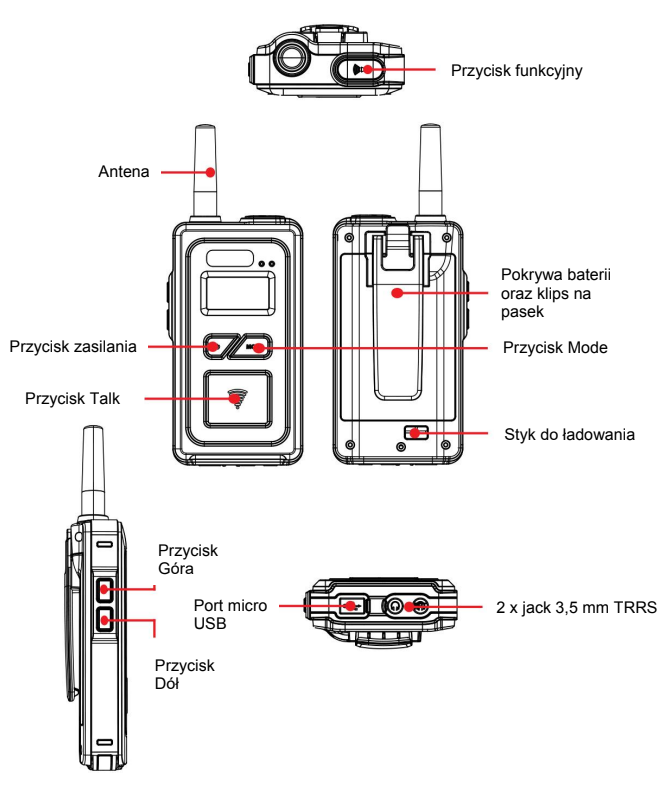
|
Device Component |
Function |
|---|---|
|
1. Power Button |
Press and hold the power button for more than 2 seconds to turn the device on/off. |
|
2. Mode Button |
Group number, ID number, listen path on/off, microphone sensitivity level, PIN code. |
|
3. Up Button |
Increases volume level, group number, ID number, etc., in each device. |
|
4. Down Button |
Decreases volume level, group number, ID number, etc., in each device. |
|
5. Talk Button |
Talk on/off in Group mode, Mute on/off in Team mode. |
|
6. Function Button |
Talk on/off for ID 01~08 and PTT for ID 09. |
|
7. Headphone-Microphone Jack |
2 x 3.5 mm TRRS jack. |
|
8. Antenna |
External, dipole. |
|
9. USB Jack |
Micro USB port for battery charging and system updates. |
|
10. Charging Contact |
Contact for battery charging in the bulk charger. |
3. Operation
3.1 Power On / Off
Press and hold the power button for more than 2 seconds to turn the device on/off.
3.2 Volume Up / Down
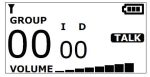
- Press the + button to increase volume and the - button to decrease volume after turning on the device.
- The display initially shows the default volume level 03.
- Volume level adjustment is available in the range of 0 - 8.
3.3 Group Selection
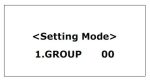
- Press and hold the MODE button until "Setting Mode" is displayed. Select the group number 00 - 39 for the 2.4 GHz version you wish to operate on by pressing the + or - button.
- Press and hold the MODE button again to exit the settings panel. The device remembers the selected group.
3.4 ID Number Selection
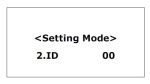
Within each group, ID numbers 00 - 08 are assigned to only one Grand Multicom. ID09 and ID10 can be assigned to an unlimited number of devices.
- ID00 (Master User) – the main ID for only one device, required to create a group; without a device with ID00, it is impossible to transmit a signal.
- ID01-08 (User) – IDs enabling hands-free transmission; one ID number per device from the available pool.
- ID09 (PTT User) – ID for an unlimited number of users; transmission within the group is enabled by pressing the TALK / FUNCTION button.
- ID10 (Listen) – ID for an unlimited number of users; only reception of transmission within the group is possible.
Press and hold the MODE button until "Setting Mode" is displayed. Briefly press the MODE button once to display "ID" in "Setting Mode".
Select the appropriate ID number for the device by pressing the + or - button. Press and hold the MODE button again to exit the settings panel. The device remembers the selected ID.
3.5 Sidetone
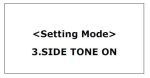
- Press and hold the MODE button until "Setting Mode" is displayed. Briefly press the MODE button twice to display SIDE TONE in "Setting mode".
- Select Side Tone ON or OFF by pressing the + or - button. Press and hold the MODE button again to exit the settings panel. The device remembers the selected setting.
3.6 Microphone Sensitivity Level
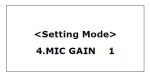
- Press and hold the MODE button until "Setting mode" is displayed. Briefly press the MODE button three times to display MIC GAIN in "Setting Mode".
- Select microphone sensitivity level 1 - 5 by pressing the + or - button.
- Press and hold the MODE button again to exit the settings panel. The device remembers the selected setting.
3.7 PIN Number Configuration for the Group
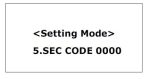
- Press and hold the MODE button until "Setting mode" is displayed. Briefly press the MODE button four times to display SEC CODE in "Setting mode".
- The PIN code consists of four characters and can be selected using digits 1 - 9, letters A, B, C, D, E, F with the + or - buttons.
- Press and hold the MODE button again to exit the settings panel. The device remembers the selected PIN code.
4. Technical Specification
|
Parameter |
Value |
|---|---|
|
Dimensions |
122.7 x 23.5 / 31.0 (with belt clip) x 67 mm |
|
Weight |
180 g |
|
Frequency Band |
2407 MHz ~ 2476 MHz |
|
Modulation |
GFSK with FHSS |
|
Codec |
16 bit / 8 kHz |
|
Max. Output Power |
100 mW |
|
Receiver Sensitivity |
-95 dBm |
|
Headset Inputs / Outputs |
Microphone: 3.5 mm jack (electret, 30 dB gain). |
|
External Interfaces |
2x 4-pole 3.5 mm jack, Micro USB (charging and update). |
|
Latency |
< 180 ms (typical) |
|
Number of Available Channels |
40 channels (2.4 GHz version) |
|
Bandwidth |
500 kHz |
|
Battery Type |
Li-ion 3.7 V / 2000 mA |
|
Antenna |
Detachable dipole antenna |
|
Transmission Range |
Up to 500 m (2.4 GHz version) |
|
Frequency Response |
50 Hz ~ 4 kHz |
|
Max. Number of Users |
10 (full duplex, including Master ID00) |
|
Indicators |
OLED display: group, ID, volume, signal, battery, operating mode, talk status. |
|
Battery Life |
Typically 15 hours |
|
Battery Charging Time |
3 to 5 hours |