


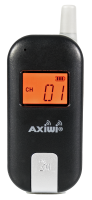
Axiwi AT-350
1. Device Diagram
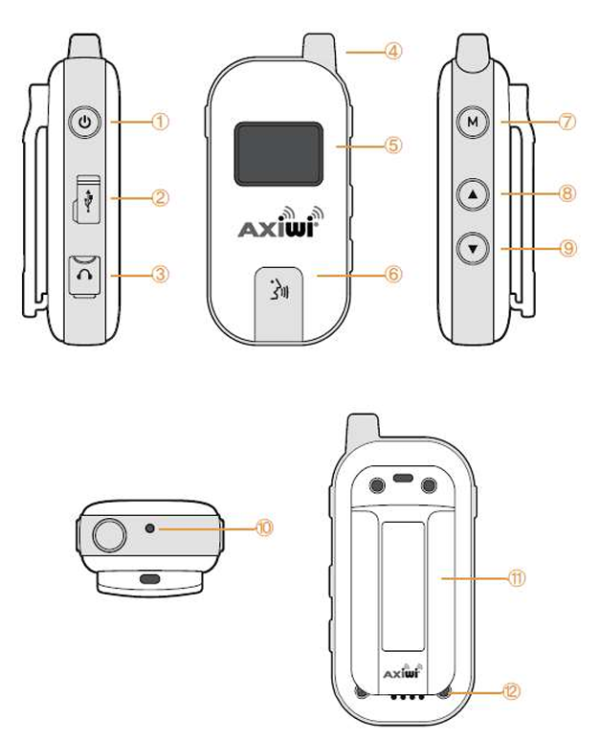
|
Element |
Function |
|---|---|
|
1. Power Button |
Turns the device on and off |
|
2. Micro USB Port |
Charges the battery using a USB cable |
|
3. 3.5 mm Jack |
For connecting a headset with microphone |
|
4. Antenna |
Antenna for transmitting / receiving transmissions |
|
5. LCD Display |
Provides important information to the user |
|
6. TALK Button |
Turns transmission (microphone) on and off |
|
7. MENU Button |
Unlocks channel change |
|
8. UP Button |
Used to increase transmission reception volume and change channel |
|
9. DOWN Button |
Used to decrease transmission reception volume and change channel |
|
10. LED Indicator |
Indicates battery charging status (Red - charging, Green - charged) |
|
11. Belt Clip |
Used to attach the device |
|
12. Battery Contacts |
Used for charging the device in a dedicated multi-charger |
⚠ Note
Before configuring the AT-350 system, it is recommended to connect the headsets with microphones to the 3.5 mm jack sockets on the devices.
2. Display Diagram
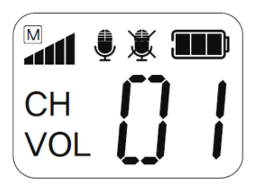
|
Icon |
Function Description |
|---|---|
|
|
Information about MASTER mode |
|
|
Information about signal reception in devices |
|
|
Indicates that transmission (microphone) is on |
|
|
Indicates that transmission (microphone) is off |
|
|
Indicates battery status |
|
|
Indicates channel number |
|
|
Transmission reception volume level: 00 – 06 |





3. Starting the AT-350
Activating MASTER mode
- Press and hold the power button ⏻ and the ▲ button simultaneously for approx. 2 ~ 3 seconds.
- The LCD display will turn on, and a voice message MASTER ON will be heard in the headset.
Activating SUBMASTER mode
- Press and hold the power button ⏻ and the ▼ button simultaneously for approx. 2 ~ 3 seconds.
- The LCD display will turn on, and a voice message TALK ON will be heard in the headset.
Activating FOLLOWER mode
- Press and hold the power button ⏻ for approx. 2 ~ 3 seconds.
- The LCD display will turn on, and a voice message SLAVE ON will be heard in the headset.
Turning off the device
- Press and hold the power button ⏻ for approx. 2 ~ 3 seconds.
- The LCD display will turn off, and a voice message POWER OFF will be heard in the headset.
4. Device Modes
|
Graphic |
Operating Mode |
|---|---|
|
|
Activated as master |
|
|
Activated as submaster |
|
|
Connected to master |
|
|
Activated as follower |
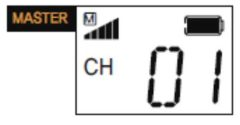
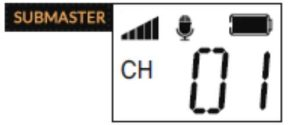
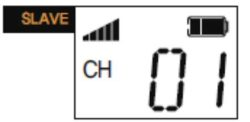
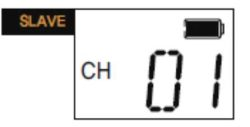
MASTER MODE
MASTER is a device that enables communication for the entire group and manages it. Each communication channel in the Axiwi AT-350 system must have one device operating in MASTER mode. If there is no device in this mode on the channel or it turns off, the entire group loses the ability to communicate with each other.
After activating MASTER mode and connecting a microphone to the jack, the user of such a device can immediately communicate with the group. None of the users of SUBMASTER or FOLLOWER devices can mute or remove the "master" from the group.
SUBMASTER MODE
SUBMASTER is a device that, similar to MASTER, can communicate with the entire group immediately after activation, but it does not have the MASTER's functions. A maximum of 5 devices in SUBMASTER mode can operate on one channel, but this blocks the ability to transmit (speak into the microphone) for devices in FOLLOWER mode. Turning off a device in SUBMASTER mode will not cause any communication disruptions for the entire group.
After activating SUBMASTER mode and connecting a microphone to the jack, the user of such a device can immediately communicate with the group. The MASTER user and FOLLOWER users cannot mute or remove the SUBMASTER from the group.
FOLLOWER MODE
FOLLOWER is a device that can communicate with the entire group or only be an audio transmission receiver. An AT-350 in FOLLOWER mode can only join or leave group communication. Simultaneously, 5 users + 1 MASTER (if no SUBMASTER devices are operating in the group), i.e., 6 devices operating in full duplex, can communicate with each other. If a 7th user joins the conversation, the AT-350 user in FOLLOWER mode who has had communication mode (microphone on) enabled for the longest time is automatically removed from communication mode.
5. Volume Level
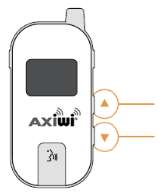
- Press the ▲ (UP) / ▼ (DOWN) button, the [VOL] symbol.
- Change the volume level by pressing the ▲ (UP) / ▼ (DOWN) buttons.
- If no buttons are pressed, the screen will return to the default state after 1.5 seconds.
- The audio reception level can be adjusted from 00 to 06.
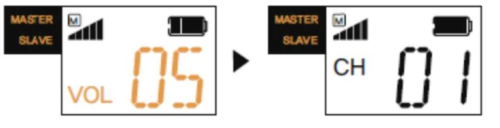
6. Changing the Channel
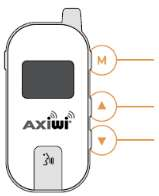
- Press the MENU button, the [CH] symbol will start flashing.
- Change the channel using the ▲ (UP) / ▼ (DOWN) buttons.
- Press the MENU button again to confirm the channel selection.
- Channel memory function: The device remembers the previous channel number after restarting.
7. Turning Transmission On / Off (applies to FOLLOWER)
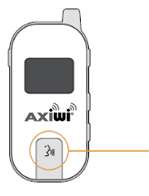
Turning transmission (microphone) on
- Press the TALK button.
- The microphone on symbol will appear on the display, and a voice message TALK ON will be heard in the headset.
Turning transmission (microphone) off
- Press the TALK button.
- The microphone symbol will disappear from the display, and a voice message TALK OFF will be heard in the headset.
8. Option for managing the group of FOLLOWERS
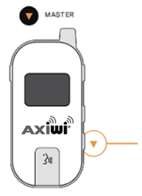
Confirms blocking microphone transmission on all devices in FOLLOWER mode on the channel. This does not apply to devices in SUBMASTER mode.
- On the MASTER device, press and hold the ▼ (DOWN) button for approx. 3~5 seconds.
- The locked microphone symbol will appear on the FOLLOWER device's display, and a 'toot-toot' voice message will be heard in the headset.
- At this point, the user in FOLLOWER mode cannot communicate in the group.
Unblocking transmission for FOLLOWER
- On the MASTER device, press and hold the ▼ (DOWN) button for approx. 3~5 seconds.
- The locked microphone symbol will disappear from the FOLLOWER device's display, and a 'toot-toot' message will be heard in the headset.
9. Battery Charging Status
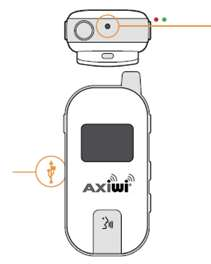
- The device can be charged using a Micro USB cable.
- During charging, the red LED on top of the device lights up.
- When charging is complete, the green LED lights up.
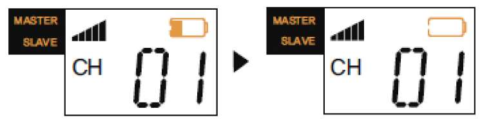
- The remaining battery level is displayed on the battery icon.
- When the battery level is low, a "BATTERY LOW" sound signal (10 times for 5 min.) is heard in the headset, and the battery icon flashes.
10. Technical Specification
|
Parameter |
Value |
|---|---|
|
Frequency band |
863.15 MHz ~ 865 MHz |
|
Modulation |
GFSK |
|
Number of channels |
8 |
|
Simultaneous full-duplex communication |
Up to 6 users (1 MASTER + 5 SUBMASTER / FOLLOWER) |
|
Communication modes |
MASTER, SUBMASTER, FOLLOWER |
|
Frequency per channel |
863.15, 863.40, 863.65, 863.90, 864.15, 864.40, 864.65, 864.90 |
|
Frequency response |
Below 300 kHz |
|
Transmission output power |
10 mW |
|
Transmission range |
+/- 300 meters line of sight |
|
Battery capacity |
Li-Pol 3.7 V 1300 mAh |
|
Battery operating time |
Max. 10 hours |
|
Battery charging time |
~ 4 hours |
|
Dimensions |
38 x 78 x 19 mm |
|
Weight |
70 g |
|
Charging port |
Micro USB |
|
Headset jack |
3.5 mm Jack |
|
Ingress Protection (IP) rating |
IP54 |